Minecraft Packed Ice Bricks: Preview 26.70.21 guide
Explore Minecraft Packed Ice Bricks, their building variants and the new ice sounds in Bedrock Preview 26.70.21. Check official access and safe testing steps.
Updated 2026-10-23 · MapMC Editorial
Minecraft Packed Ice Bricks are decorative blue building blocks introduced in Bedrock Preview 26.70.21 on October 20, 2026. Mojang lists bricks, slabs, stairs, walls and a chiselled variant. They do not melt, and a pickaxe is the recommended tool. This page covers that test build; availability in another release must be checked separately in its own notes.
What can you build with Minecraft Packed Ice Bricks?
The new family offers several shapes for a cold-coloured build. Here is a small design brief you can try in a disposable Creative world:
| Shape announced by Mojang | Small building experiment |
|---|---|
| Bricks | Compare a plain facade with a brick facade |
| Slabs | Try a shallow entrance step or trim |
| Stairs | Compare a stepped roof with a flat roof |
| Walls | Outline a courtyard or balcony |
| Chiselled blocks | Add a few accents around a doorway |
These are MapMC design suggestions, not tested structures or official recipes. Keep the five samples side by side so you can judge the palette before rebuilding a large area. The official announcement does not specify a crafting grid or output count. Check the recipe book in the build you installed; this guide does not invent a recipe or promise that a recipe from another version will work.
How do you try Preview 26.70.21 safely?
First check your Edition, platform and installed version. The official Preview notes list Preview on Windows, Xbox, PlayStation and iOS, and the Android Beta through Google Play. Preview is an in-development build and may be unstable. A store may offer a newer test build by the time you read this; check that build's notes instead of assuming it is still 26.70.21.
On Android, Mojang's mobile installation guide says to open the Minecraft listing in Google Play, find Join Beta and confirm Join. The Beta replaces the normal Android client, so finish your backup before enrolling. iOS access uses TestFlight and has limited places; a full programme is not a broken download.
Use the official access links and your platform's store. This page does not host a game installer, APK or activation key. If the official guide or enrolment page does not load, stop there rather than replacing it with an unknown download.
Which ice makes the new ambient sound?
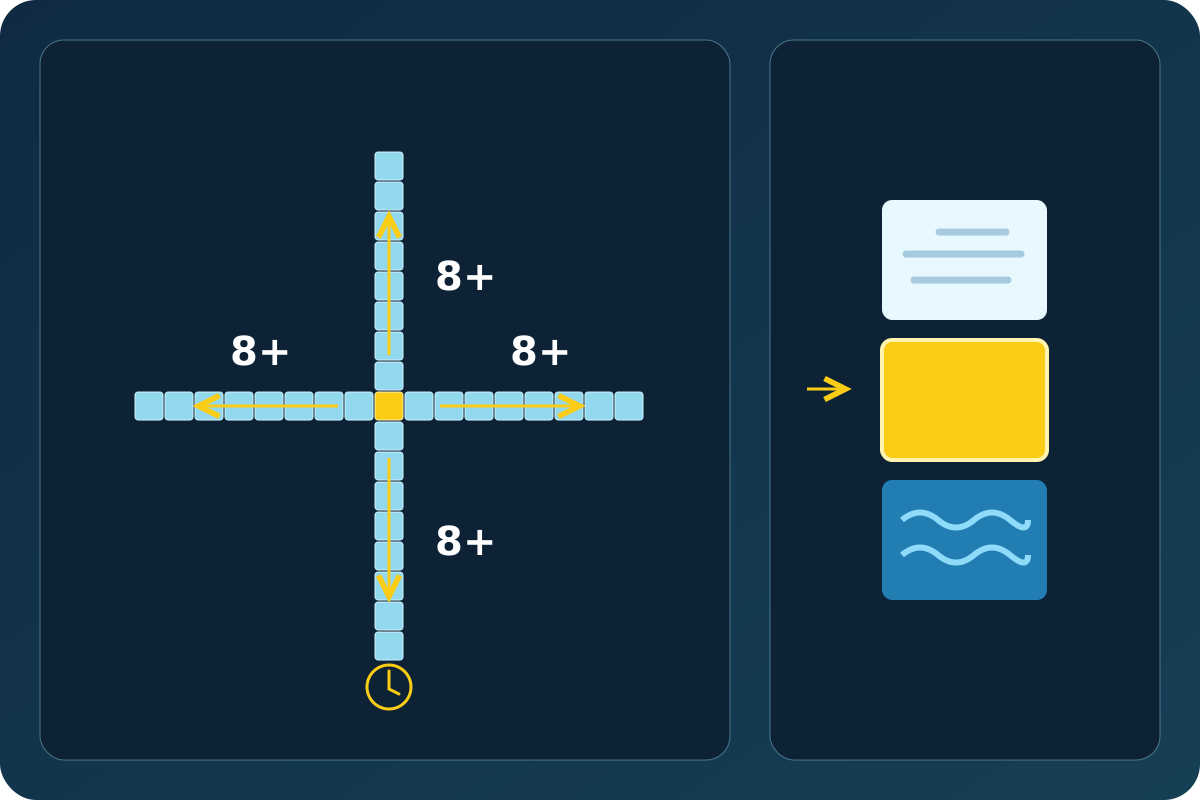
The sound condition in Mojang's notes applies to Ice, not a promise that a Packed Ice Bricks wall will sing. For a candidate Ice block, the notes require ice extending at least eight blocks in each of the four horizontal directions, one air block directly above and one water block directly below. Even with the arrangement present, the sound only has a chance to play.
Read the lead diagram as a checklist: each arrow represents a separate direction. Eight blocks in total is not the stated condition. The diagram is a schematic interpretation of the notes, not a recording of a tested game world. Packed Ice, Blue Ice and Frosted Ice also receive their own block sound events in this Preview; that is a separate change from the Ice ambient condition.
What should you check if something is missing?
| What you see | Next check |
|---|---|
| Minecraft Packed Ice Bricks are missing | Read the version on your title screen and compare its own changelog; do not assume a stable client has Preview content |
| No ambient sound | Recheck each horizontal direction and the blocks above and below; silence alone does not establish that the layout is wrong |
| Recipe differs from a video | Use the recipe book and notes for your installed build; do not substitute a recipe based only on appearance |
| World looks different or fails to reopen | Stop editing the test copy and return to your preserved original |
Can you use Minecraft Packed Ice Bricks in a MapMC world?
MapMC creates a world from the real-world area you select. This Wiki article adds no Preview option to the generator, no new block palette and no guarantee of Preview compatibility. An existing generated area is not promised to gain new vanilla terrain or structures. For building inspiration, browse the MapMC case maps; inspect each map's listed Edition and version separately.
Before any version experiment, keep the original download untouched and follow the world backup guide. Check that the backup exists and can be restored before relying on it. Use a disposable test world for these block experiments. For an existing world, follow opening a world in a newer version safely: inspect a copy, save, exit and reopen the same copy. If that check fails, preserve the original; do not try to repair it by repeatedly opening it in different versions.
Is this also a Java update?
26.70.21 is a Bedrock Preview version number. The checks here do not establish Java availability, stable-release compatibility or multiplayer support. Use the notes for your exact target release. If you are unsure which game you have, start with Java versus Bedrock Edition.
Facts checked October 23, 2026. The official notes are the source for release facts; the proposed mini-build, decision table and schematic are editorial aids. No 26.70.21 game-client acceptance test is claimed.
Sources and review basis
We use official documentation where available and show the references used for factual claims.