Minecraft Roulette: Redstone Builds, Randomness and Testing
Choose a Minecraft roulette build, follow the ClownPierce table tutorial, check Java or Bedrock requirements and test the result before adding it to your world.
Updated 2026-10-05 · MapMC Editorial
Minecraft roulette usually means a redstone table with a moving display and a final result. If you want the ClownPierce-style build, start with the MrCube6 tutorial on DrCube6's channel. Choose a design for your Edition, build in a copy or a test world, then check start, stop and reset before decorating the table.
Choose the kind of roulette you need
| Your goal | Suitable approach | What you must verify |
|---|---|---|
| Build a working table inside a world | A redstone construction tutorial | Edition, version, layout and a repeatable reset |
| Pick a building challenge or destination | A list of choices and a random picker | Clear choices; a browser wheel does not place blocks in Minecraft |
| Add a multiplayer minigame | A tested redstone table or a separately reviewed server extension | Server permission, compatibility and who can change the result |
This guide covers choosing and checking an in-world build. It does not provide a ready-made schematic, plugin or downloadable roulette world.
Check the author and Edition first
The linked video was published on July 2, 2022. Its description connects the build to ClownPierce and Lifesteal SMP, including a story about manipulating the outcome. Treat it as a construction reference, not evidence that the table is fair. The description checked here does not establish a supported current Java or Bedrock version.
The independent imamo roulette project illustrates the downloadable-world approach. SirTomTom's project says its author built in Java and converted to Bedrock. That statement concerns that author's build; it is not a general compatibility guarantee. We have not run either download or reproduced the video circuit in a current client.
Check your Java or Bedrock Edition and the tutorial's exact version before copying. A phone or tablet running Bedrock still needs a design checked for Bedrock; a desktop computer can run either Edition. Ask the author when the supported version is unclear.
Separate the four jobs of the table
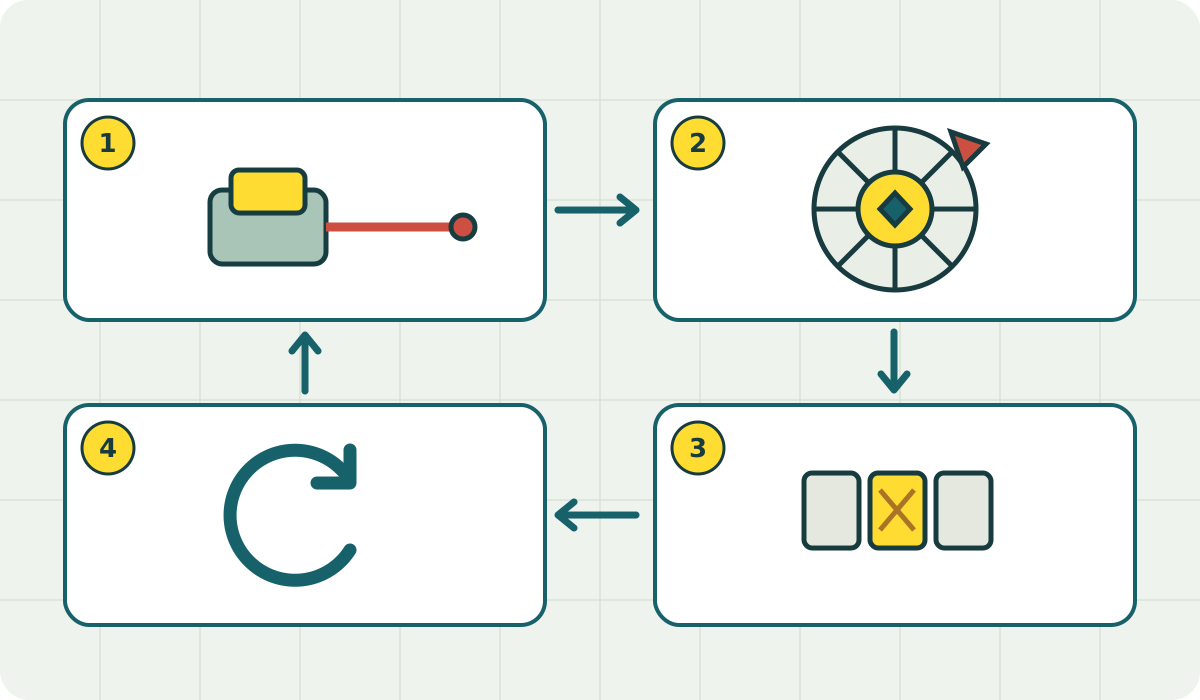
Use the diagram above as a planning checklist: input → selection → display → reset. Keep enough access around the underside to inspect each part before hiding it behind decoration.
- Input: one deliberate start action; decide what should happen if another player presses it during a round.
- Selection: the part that chooses the result. The visible spinning effect alone does not establish how the choice is made.
- Display: one result players can agree on. Mojang explains that redstone lamps light when powered; a lit lamp reports a signal, not an audited random selection.
- Reset: return to a clearly defined ready state so the previous result cannot be mistaken for the next one.
If a design uses a dropper, Mojang's dropper explanation confirms nine inventory slots, one item per activation, and transfer into a facing container. Those facts do not establish the odds of an entire roulette circuit. Take material quantities and block placement from the chosen design, not from this concept diagram.
Follow the reference in stages
The author's chapter links make it easier to inspect one layer at a time:
- 0:32 — lights: compare the display positions with the reference before adding the surrounding table.
- 1:21 — circuits: compare connections and component directions while they remain visible.
- 2:17 — mechanics: check the remaining construction against the author's layout.
- 3:28 — demonstration: compare the expected operation, then test your own start, stop and reset sequence.
These timestamps are navigation aids, not a newly verified recipe. If a stage behaves differently in your client, pause there rather than conceal the circuit and continue.
Test the result, not just the animation
Our suggested acceptance check is to record the Edition, version, design link, each outcome and any reset failure. Try repeated rounds, a second start during a round, and a save-and-reopen cycle in the test copy. For a server, repeat the checks in the actual server environment before inviting players.
A small sample can reveal stuck results or missing choices; it cannot prove equal probabilities. An apparently varied animation can still produce a predictable or operator-controlled outcome. If fair selection matters, inspect how the design chooses and stores the result, who can alter it, and whether the display matches it. Keep the activity to building challenges or casual play without paid stakes.
When the table does not behave as expected
| Observation | First check | Next step |
|---|---|---|
| Nothing starts | Compare the input path and component directions with the reference | Test the input separately in the working copy |
| Lamps keep running or never settle | Compare the stop and reset parts with the demonstration | Restore the last working stage; do not change several timings at once |
| An item-based design stops producing output | Check inventory and the destination container | Refill or clear only as the chosen design requires, then retest |
| It works locally but fails after moving or on a server | Recheck Edition, version and the target environment | Test a fresh copy there; do not assume world conversion preserved the mechanism |
These are diagnostic checks, not confirmed causes for every design. If the original copy also fails, send the author your version and a description of the failing stage rather than guessing a universal fix.
Add it to a MapMC world
The MapMC Generator creates a world from a selected real location, delivered as a Java ZIP or Bedrock .mcworld. You can use that world as the setting for a plaza, arcade or challenge room and build the table yourself. MapMC does not generate the roulette circuit or supply the creators' world files.
Keep the original download, import a working copy, and follow the backup and restore guide before editing an existing world. Open the backup copy to verify it loads. Preserve a working checkpoint before adding the circuit; if testing damages the world, return to that checkpoint. Reopen the finished copy and test the table before sharing it, and check a creator's permissions before redistributing their files.
Last checked
Sources and product boundaries checked October 5, 2026. This is a selection and testing guide with original acceptance criteria; current-client compatibility, an exact material list and the statistical fairness of the referenced builds have not been verified by MapMC.
Sources and review basis
We use official documentation where available and show the references used for factual claims.