Prepare a Minecraft World for Realms Upload
Verify the local world, keep two identifiable copies, match Java or Bedrock, and give a Realm owner a safe upload handoff before any slot is changed.
Updated 2026-08-13 · MapMC Editorial
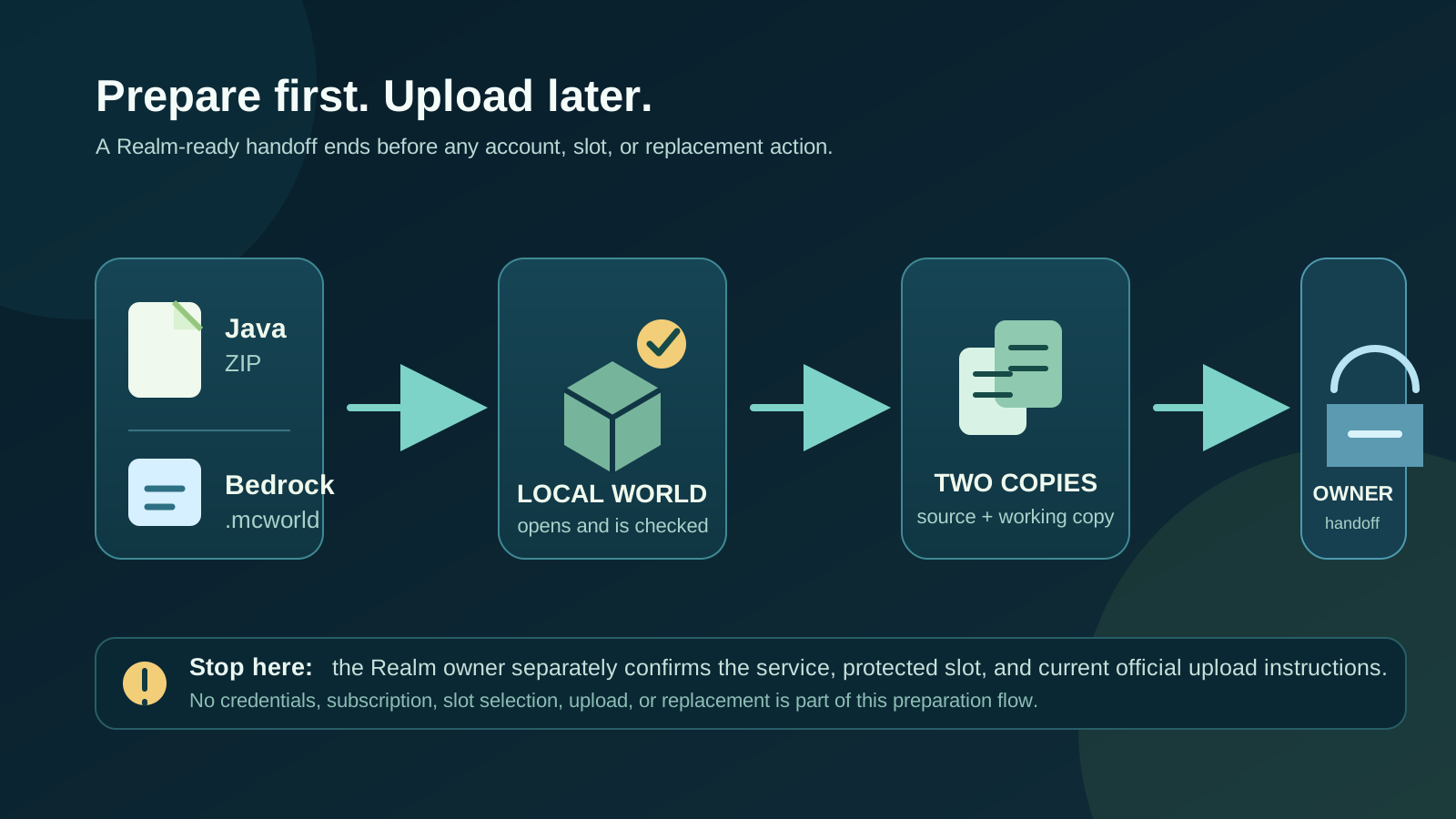
Prepare the local world before anybody opens a Realm upload screen. Match Java or Bedrock with the receiving Realm and players, prove that the local world opens, keep an untouched source plus a separately named working copy, and give the Realm owner a short handoff record. This guide deliberately stops there: it does not ask you to sign in, subscribe, select a Realm, upload, replace a slot, or invite anyone.
That boundary is intentional. A current official upload path belongs to the account owner and can change with the client. Preparation is still the part that prevents the most avoidable failures: the wrong Edition, an unopened package, duplicate worlds with indistinguishable names, a missing dependency note, or an owner replacing a slot before a rollback copy exists.
This guide stops before the Realm action
Use this page when you have a local world that may later be uploaded to a Minecraft Realm, but you do not want to purchase, configure, or test a Realm just to get the world ready. The outcome is a handoff package a Realm owner can inspect before they follow Minecraft's current official Java or Bedrock instructions.
The owner—not MapMC, this guide, or a player who only has membership access—must decide whether they have the correct service, permission, subscription, destination, and a safe slot. If the owner sees a sign-in, payment, agreement, parental-control, or platform-online gate, stop there. Those are account decisions, not file-preparation steps.
Do not treat a green game launch, a saved ZIP, or a successful .mcworld import as proof that a Realm upload will succeed. It proves only one readiness condition: the source can be identified and tested locally in the matching Edition. It is valuable evidence, but it is not a promise about a hosted service, another device, optional content, or a future client update.
Match the Edition, package, and recipient
Minecraft Realms keeps Java and Bedrock separate. A Java world belongs with a Java Realm and Java players; a Bedrock world belongs with a Bedrock Realm and Bedrock players. A filename change does not convert either the world format or the service it can use.
For a MapMC delivery, keep the two artifact types distinct:
| You have | It becomes ready only after | Do not assume |
|---|---|---|
| A Java ZIP | It is extracted into the intended Java local-world location and opens in Java Singleplayer | Renaming it .mcworld, pointing a server folder at it, or launching an offline profile makes it a Bedrock or Realm world |
A Bedrock .mcworld | It is imported into the intended consumer Bedrock client's local world list and opens there | Renaming it .zip, opening it in Java, or using Minecraft Education proves consumer-Bedrock or Realm behavior |
| A folder or download of unknown origin | Its Edition, root, creator, and first local launch have been identified | The first extension or a similar-looking icon proves its format, integrity, or rights |
Write the Edition in the folder name and in the handoff card: for example, river-valley-java-working or river-valley-bedrock-working. Use a descriptive name that separates a source from an imported local result. That is safer than relying on one remembered Realm name or the date shown in a file browser.
If the source cannot be assigned to Java or Bedrock with confidence, do not involve Realms. Return to the cross-platform import guide and resolve the package first. The Realm workflow cannot decide the Edition for an unknown file.
Prove the local world before you hand it off
Open the intended local world in the matching Edition before it reaches a Realm owner. The goal is a small, reproducible observation—not a long play session or a destructive conversion attempt.
- Start the matching local client and select the working copy, not the untouched delivery artifact.
- Record the visible world name, Edition, client version, and the date of the check.
- At spawn, note two or three recognizable landmarks. For a MapMC world, useful clues include coastline, road layout, elevation, major buildings, or a known real-world location.
- If the world needs a setting, datapack, Add-On, resource pack, experiment, command permission, mod, or version to look as expected, record that fact. Do not promise that it will work in Realms just because it works locally.
- Save and leave normally. Reopen the same local copy once. This distinguishes “it appeared in a list” from “the selected source can be found again and opens.”
If the world is missing, looks wrong, errors on first launch, or appears as several indistinguishable copies, stop at that local stage. Preserve all candidates, collect the exact message privately, and use the world-not-showing guide or the relevant import owner. Do not delete worlds by name alone and do not retry a future Realm action to diagnose a local file problem.
Make two identifiable copies
Keep one source untouched and one working copy that you can open and hand over. “Two copies” means two independently identifiable items in known locations—not two shortcuts, browser tabs, cloud views, or duplicate names that point to the same file.
| Copy | Purpose | Minimum check |
|---|---|---|
| Clean delivery source | Preserves exactly what MapMC or the original creator delivered | It remains unchanged, has a known location, and is not the copy you open, rename, or modify |
| Tested working copy | Provides the local world the owner may later select after they verify the Realm destination | It has a descriptive name, matching Edition, local launch record, and known landmarks |
Keep the clean source until the Realm owner has completed their separate, authorized upload process and the people responsible have accepted the hosted result. A local save, a downloaded Realm world, and an automatic Realm backup are different recovery artifacts. One does not silently replace another.
For especially important worlds, write the source path or storage location in the handoff card and avoid moving both copies while troubleshooting. If you later need to make a change, make it on a new working copy and preserve the last locally verified one. This makes it possible to explain what changed instead of guessing after several retries.
Build the upload handoff card
Give the Realm owner a short factual record rather than a vague message such as “upload the newest world.” They need enough information to choose the correct local candidate and know when to stop; they do not need your Microsoft password, payment receipt, invitation link, player list, or private screenshots.
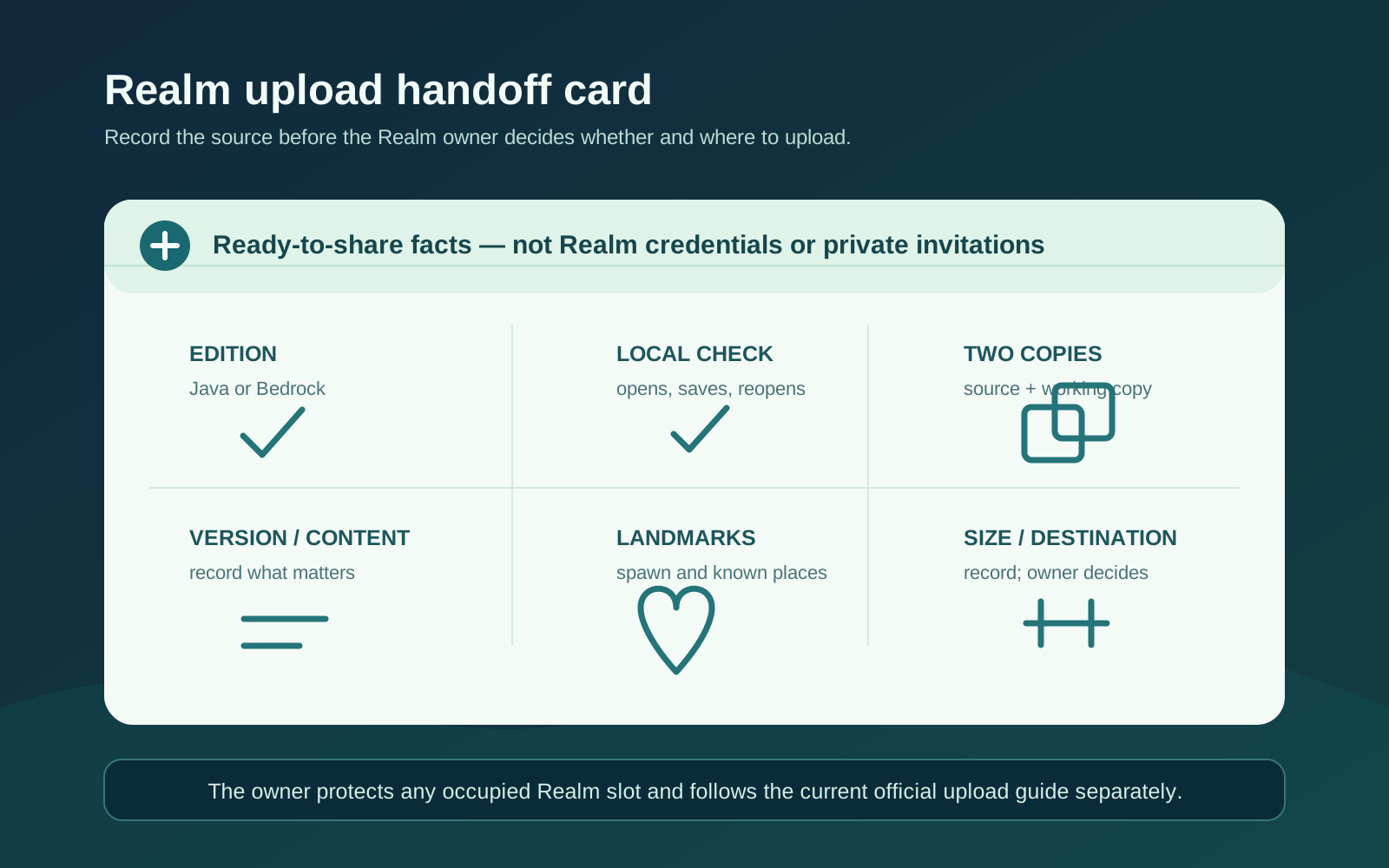
Use this checklist. A blank or unknown value is a stop condition, not an invitation to guess.
| Record | What to write | Why it matters |
|---|---|---|
| Edition and local client | Java or Bedrock, plus the client/version used for the local check | Keeps the destination and player group from being mixed |
| Working-copy identity | Exact visible world name, storage location, and date checked | Helps the owner distinguish it from older or similarly named worlds |
| Clean source identity | Delivery filename/location and whether it remains untouched | Preserves a recovery point if the working copy changes later |
| Local proof | “Opened, saved, and reopened” plus two landmarks | Gives the owner a concrete way to recognize the intended result later |
| Content notes | Required packs, settings, experiments, versions, or known limitations | Avoids silently promising universal compatibility |
| Size | A dated file/folder size and whether it is comfortably below the current official limit | Signals a service-boundary question before a slot is touched |
| Destination question | “Empty slot available?” or “occupied slot needs verified download first?” | Makes the owner address replacement risk before choosing a local world |
Let the Realm owner protect the destination
This page does not tell anyone which buttons to press inside a Realm. It does establish one non-negotiable precondition for a planned replacement: an occupied destination should have a downloadable, identifiable rollback copy before the owner changes it. Minecraft's own Realm guidance recommends downloading a world before replacement and warns that Realm backups are not retained indefinitely.
The owner should confirm, in their current client and on the matching official guide:
- that the receiving Realm is Java or Bedrock as recorded in the handoff card;
- whether they are the account owner who can manage the destination;
- whether the intended destination is empty or already contains progress;
- that any occupied world was downloaded and can be recognized locally; and
- that they understand the final upload or replacement confirmation is a data-changing action.
Do not ask a friend to send a password, verification code, account screenshot, Realm invite, or billing evidence to prove these conditions. If ownership or the destination is unclear, the owner should pause and resolve it privately through Minecraft or the relevant platform. A Realm member can help identify landmarks after a future upload, but membership is not a substitute for owner authority.
Review size, version, and optional content
When checked on August 13, 2026, the current official Java and Bedrock upload pages each documented a 4 GB maximum world size. Treat this as a dated service limit, not a file-format guarantee. Record the size and check the current official page again at the moment of the owner-controlled upload, especially when the world is near the boundary.
Do not try to make a world “Realm compatible” by deleting random folders, renaming extensions, stripping files from the only copy, or trusting an unknown online fixer. Those moves can destroy the useful evidence that tells you whether the issue is the source, the Edition, an optional dependency, or a service constraint.
Instead, record what the local proof actually showed:
- The client/version used to open the world.
- Any experimental options, packs, commands, mods, Add-Ons, or custom behavior that mattered locally.
- Whether the source is a clean MapMC delivery, an edited copy, a downloaded Realm copy, or a world from another host.
- Any message, missing content, or difference observed during the local recheck.
This is an inventory, not a compatibility promise. Java and Bedrock have separate content ecosystems, and a locally visible feature may still require separate research before a Realm owner decides to use it. If the destination is actually a dedicated server or a device transfer, use the linked owner guide rather than forcing the problem through Realms.
Stop at the readiness problem
The safest fix is usually to stop at the first uncertain boundary. Change one thing only after you can explain what it changes and which copy protects the previous state.
| What you see | Readiness stage | Safe next action | Do not do |
|---|---|---|---|
Only a ZIP, .mcworld, or folder exists; no local world has opened | Local proof | Resolve the correct import/extraction path on a working copy | Send an unopened package to a Realm owner as if it were ready |
| Java and Bedrock labels conflict | Edition | Confirm the source and the player/Realm Edition before proceeding | Rename an extension or rely on a launcher icon as conversion |
| Several worlds have the same name | Identity | Add dated, descriptive working-copy names and record landmarks | Delete candidates or choose the first matching name |
| A required pack, experiment, or mod is unknown | Content inventory | Record the uncertainty and test the local source before any hosted decision | Promise that it will survive a Realm upload unchanged |
| The world is near the dated 4 GB limit | Service boundary | Ask the owner to recheck current official limits before changing a slot | Compress, trim, or delete data from the only source on speculation |
| The destination is occupied or the owner cannot identify it | Destination protection | Stop until the owner has a recognized download and a clear plan | Treat automatic backups, memory, or a screenshot as rollback proof |
| Someone asks for account, invite, billing, or verification details | Account privacy | Keep the preparation record limited to world facts; resolve account issues privately | Share credentials or post private evidence in a support request |
Know what MapMC delivers—and what it does not
MapMC delivers Java generations as a ZIP and Bedrock generations as a .mcworld package. The two files must enter their matching local edition before you can make the readiness record in this guide. MapMC can help you generate a world from a real place; it does not turn Java into Bedrock, install Minecraft, authenticate a Microsoft account, purchase or renew a Realm, select a slot, upload a world, preserve optional content, or operate Realm backups.
If the local source is not ready, begin with the import guide. If your goal is a server, use the Java server world guide or Bedrock Dedicated Server guide. If you need a safer local recovery process, use the backup and restore guide. Those are different tasks with different permissions and failure modes.
Frequently asked questions
Does this guide upload my world to a Realm?
No. It prepares an identified, locally checked source and a concise handoff record. The Realm owner must separately use the current official instructions for their Edition and authorize any action that changes a slot.
Can I prepare a world without owning a Realm?
Yes. You can confirm the Edition, open the working copy locally, preserve the clean source, record landmarks and dependencies, and note what the future owner must confirm. You cannot verify a subscription, owner permission, slot state, upload UI, or hosted result without the owner’s actual Realm environment.
Can I use the same world on Java and Bedrock Realms?
Not by changing the filename. Java and Bedrock Realms are separate Edition services. A conversion project needs its own tools, loss analysis, backups, and validation; it is outside this preparation guide.
Do automatic Realm backups mean the owner can skip a download?
No. Minecraft’s current guidance warns that Realm backups are not retained indefinitely and recommends downloading progress before replacement. An identifiable download is the safer precondition for a planned slot change.
What should I give the Realm owner?
Give the working-copy identity, its Edition, local check date, two landmarks, clean-source location, version/content notes, size, and the question of whether the destination is empty or already protected. Do not give passwords, codes, billing information, private invite links, or screenshots containing unrelated worlds or players.
Sources and review basis
We use official documentation where available and show the references used for factual claims.