Minecraft Java 26.2: what changed and what MapMC supports
See the main Chaos Cubed changes, which MapMC Java 26.2 tools are verified, and how to test a generated Java world without assuming compatibility.
Updated 2026-09-27 · MapMC Editorial
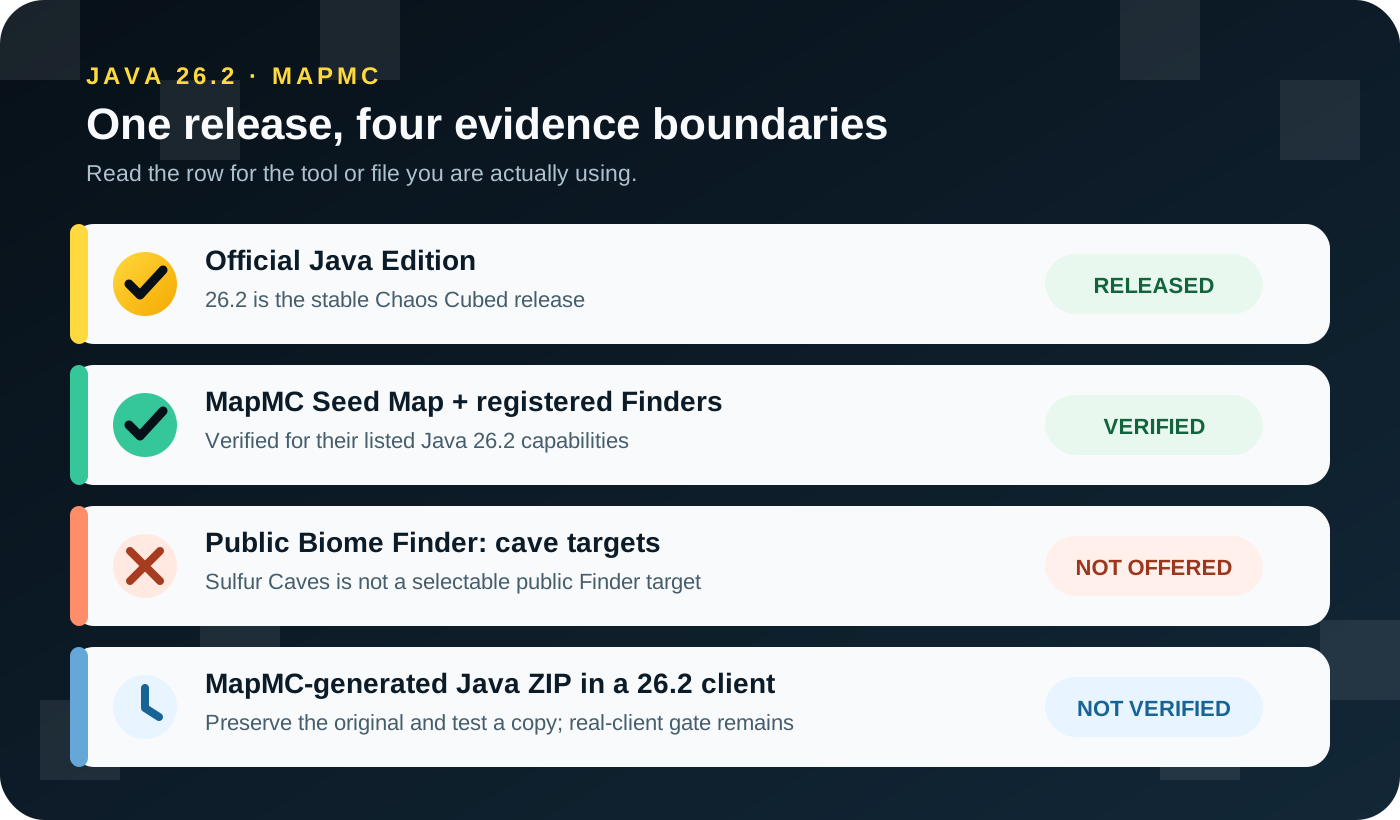
Minecraft Java 26.2 is the stable Chaos Cubed release. It adds Sulfur Caves, Sulfur Cubes, sulfur and cinnabar building sets, a Friends List, and an experimental Vulkan renderer. For MapMC, however, “Java 26.2 support” is not one blanket promise: the Seed Map and registered Finders have version-specific evidence, the public Biome Finder excludes cave-biome targets, and a generated Java ZIP has not yet passed MapMC's separate real-client 26.2 gate.
Use the exact row that matches what you are doing. Do not treat a verified seed calculation as proof that a generated world file, mod, server, resource pack, or snapshot will work.
The short version
| What you are using | Current Java 26.2 status | What that status means |
|---|---|---|
| Minecraft itself | Stable release | Chaos Cubed is a released Java Edition version, not a snapshot |
| MapMC Seed Map and registered Finders | Verified within each listed capability | Calculations use MapMC's audited Java 26.2 browser engine and the scope stated on that tool |
| Public MapMC Biome Finder | Surface-style targets only | Sulfur Caves is in the engine's biome catalog, but cave biomes are not selectable public Finder targets |
| MapMC-generated Java ZIP | Real-client gate not yet complete | Preserve the original ZIP and test a duplicate in Java 26.2; do not describe the file as verified for 26.2 yet |
| Java 26.3 | Stable release; public Seed tools still use 26.2 | Internal 26.3 tests are not general MapMC support |
This distinction matters because MapMC has two separate systems. Seed tools calculate world-generation information in the browser. The Generator runs a long-lived Worker and delivers a Java world folder inside a ZIP. Evidence from one system does not automatically cover the other.
What Java 26.2 added
The official release notes call the drop Chaos Cubed. Its headline world addition is the underground Sulfur Caves biome, which contains sulfur and cinnabar bands, sulfur pools, Potent Sulfur, Sulfur Spikes, and the new Sulfur Cube mob. Sulfur and cinnabar also received building families with polished, brick, chiseled, slab, stair, and wall variants.
Outside world generation, Java 26.2 adds a Friends List on the title and pause screens. Players can send and manage requests, see limited presence information, and control related privacy and notification settings. This is a social convenience feature; it does not turn a local world into an always-online server or make Java and Bedrock multiplayer compatible.
The release also introduces an experimental Vulkan rendering backend and a Graphics API setting. Mojang states that unsupported hardware can fall back to OpenGL and that Vulkan may be less stable or performant on some systems. Leave the default selected unless you have a reason to test another backend, and do not treat Vulkan as a guaranteed performance upgrade.
For pack authors, the official technical values are Data Pack version 107.1 and Resource Pack version 88.0. Those numbers matter to packs and technical tooling; they do not prove that an unrelated mod, plugin, server build, or MapMC world has been tested in the client.
What MapMC Seed Map and Finders support
MapMC's public seed-engine registry currently exposes unmodified Minecraft Java 26.2. The Seed Map and each registered Finder use that pinned browser engine only for the dimensions and capabilities stated on the relevant page. Existing verification for biomes or a particular structure is evidence for that task—not for every possible 26.2 feature.
The practical rule is simple:
- Select Java 26.2 only on a MapMC seed tool that publicly offers it.
- Read the tool's own capability and limitation text before using the result.
- Use the same unmodified Java Edition version and dimension in the game.
- Do not reuse the coordinates for Bedrock, older Java releases, snapshots, or modded world generation.
- Treat Finder output as a location calculation, not a promise about entrances, loot, safe travel, or the condition of unexplored terrain.
This is also why MapMC does not automatically add a new Finder whenever Minecraft adds a structure or biome. A capability is public only after its engine path and reference results pass the relevant verification.
Why Sulfur Caves is not a public Finder target
Sulfur Caves exists in MapMC's Java 26.2 biome catalog because the browser engine must understand the release's biome IDs. That catalog entry is not the same thing as a public cave-biome search feature.
The current Biome Finder deliberately supports selected surface-style targets with an explicit Y slice and bounded search radius. It does not offer cave-biome targets. Therefore, MapMC does not currently promise that the Biome Finder will locate a Sulfur Cave, identify an entrance, map an underground volume, or tell you where a Sulfur Spring will appear.
Use the official release notes to learn the biome's vanilla features. If MapMC later publishes cave-biome search, it will need its own verified capability, user-facing limits, and evidence. Until then, a page or engine ID must not be mistaken for a working sulfur-cave Finder.
How to test a generated Java ZIP in 26.2
MapMC's Generator and its Seed tools have different version boundaries. The generated Java world currently carries older base world metadata that a newer Java client may upgrade when it opens and saves the world. MapMC has not yet recorded a complete real Java 26.2 test covering open, spawn, terrain, buildings, map items, save, exit, and reopen. That means the safe statement is not yet verified, not “incompatible” and not “fully compatible.”
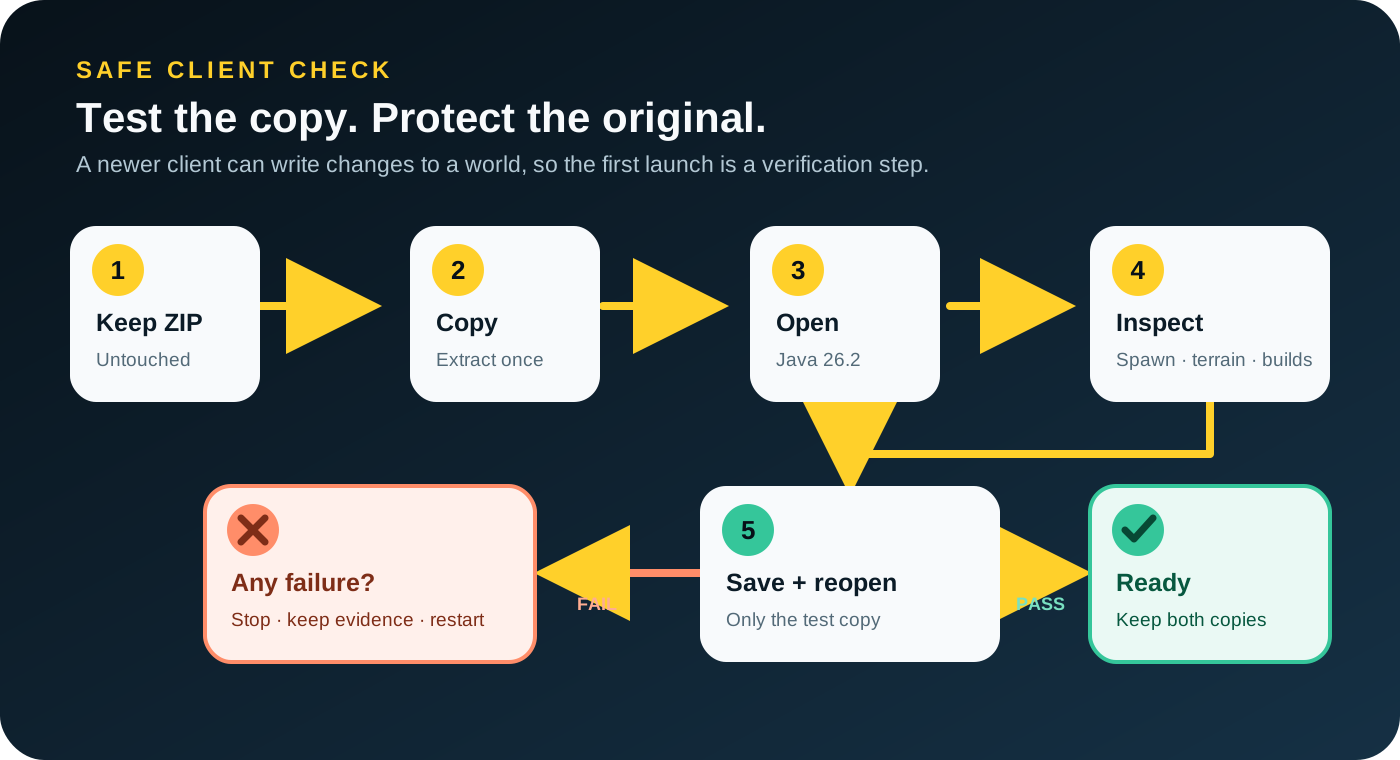
Use this narrow test:
- Keep the downloaded ZIP unchanged in a stable folder.
- Duplicate it, then extract the duplicate once. The world folder placed in
savesshould directly containlevel.dat. - Give the test copy a distinctive name before opening Java 26.2.
- Inspect the spawn point, nearby terrain, buildings, roads, water, and the supplied map item if present.
- Save, exit completely, reopen the same copy, and confirm the same checks again.
- Keep both the untouched ZIP and the successful test copy until you have played long enough to trust the result.
Stop if the world is missing, the client reports damage or incompatibility, expected terrain or buildings are absent, the map item is wrong, or save/reopen fails. Preserve the exact message privately, keep the failed copy for diagnosis, and return to the untouched ZIP. Do not repeatedly experiment on the only source file.
Friends List and Vulkan do not change MapMC files
The Friends List is tied to Minecraft and Microsoft account services, not to MapMC world delivery. MapMC does not add friends, host the world, change account privacy, or keep a local world online. Use the appropriate Java server or Realm workflow if other players need persistent access.
Vulkan changes how the Java client renders the game. It does not convert a world, add missing terrain, change a Seed, or certify a MapMC download. If the client becomes unstable after selecting experimental Vulkan, follow Minecraft's current Graphics API guidance and test OpenGL or the default option. Keep graphics troubleshooting separate from world-file diagnosis so one problem is not mistaken for the other.
What about Java 26.3?
Java 26.3 was released on September 15, 2026. MapMC has passed internal Seed/Finder reference checks and opened selected generated Java worlds in the 26.3 client. Public Seed tools still offer only 26.2; neither test covers every file, pack or server.
Keep the original ZIP or world untouched and test a copy. Follow the safe world-upgrade guide for backup, inspection, save and reopen checks.
A practical 26.2 checklist
- Confirm that you are using Java Edition 26.2, not Bedrock or a snapshot.
- For Seed Map or a Finder, read that tool's exact version, dimension, and capability limits.
- Do not use the public Biome Finder as a Sulfur Caves Finder.
- For a generated Java ZIP, preserve the original and let only a duplicate receive client upgrade changes.
- Inspect the test copy, save it, close the game, and reopen it before relying on the result.
- Keep account, server, mod, resource-pack, graphics, and world-file problems separate while diagnosing.
- Recheck the dated support statement when Minecraft or MapMC publishes a newer verified version.
The point is not to make Java 26.2 sound risky. It is to make each claim match the evidence that actually exists. That gives MapMC users a useful update summary without turning “the game released” into an unsupported promise about every tool and file.
Sources and review basis
We use official documentation where available and show the references used for factual claims.